Application Connectivity
Edge applications often require network connectivity to access other applications or some external network endpoints. EVE provides different means of connectivity, varying in properties, feature-sets and performance considerations.
Application network interfaces
Network connectivity is enabled for an application by configuring one or more network adapters. These consists of virtual network interfaces, connecting application with network instances, and directly assigned physical NIC or SR-IOV virtual functions.
Interface order
To match an application's network interface with its logical representation from the configuration, using MAC addresses is recommended. For virtual network interfaces, users can configure MAC addresses for easier interface identification. Meanwhile, directly assigned NICs are passed through to applications with their original MAC addresses unchanged.
However, since MAC addresses differ across a fleet of devices, having a predictable application network interface order provides a simpler and more scalable matching solution. But there are two main challenges related to application interface ordering, which make this method less recommended:
1. Interface Order Configuration Limitations
Virtual and directly assigned NICs are configured in two separate lists within AppInstanceConfig:
Interfaces (VIFs) and Adapters (direct assignments, including physical NICs and SR-IOV virtual
functions). Until EVE version 13.8.0, it was not possible to configure the order between items
of these two lists. Consequently, EVE would configure the VMM to present the VIFs first, followed
by direct assignments. While directly assigned NICs adhered to the Adapters list order, virtual
interfaces were ordered based on the lowest ACL rule ID assigned to each VIF. This caused undesired
behavior when ACL rule IDs (assigned by the controller) did not align with the user-defined VIF order.
Furthermore, VIFs without ACLs (rather useless interfaces since all traffic is blocked) were
represented with an ACL ID of 0 and always placed first in the interface list.
EVE version 13.8.0 addressed this by allowing users to define the desired position of each VIF and
directly assigned network devices. This is propagated from controller to EVE via the InterfaceOrder
fields with unique (integer) values across both the Interfaces and Adapters lists. To maintain
backward compatibility and avoid changing interface order in existing deployments, the user-defined
order is applied only if VmConfig.EnforceNetworkInterfaceOrder is set to true. Otherwise, EVE
defaults to the legacy behavior described above.
2. Hypervisor Limitations
The second, more fundamental challenge lies in the hypervisor's limited ability to control the order of network interfaces inside VM applications. The actual interface order depends on the application OS, and EVE cannot guarantee the desired outcome.
For the KVM hypervisor, EVE attempts to enforce legacy or user-defined orders via the virtualized PCI topology. Devices expected to appear earlier in the interface list are assigned lower PCI addresses. This generally works for Linux-based systems, especially those using the systemd's naming scheme. However, some limitations persist:
- Devices of different types (e.g., Wi-Fi adapters vs. Ethernet NICs) often receive distinct name prefixes from the application OS, making reordering impossible.
- Multifunction PCI devices must have all functions connected to the same PCI bridge and cannot be
interleaved with other devices. If a user places a VIF or another NIC between functions
of a multifunction device (with
EnforceNetworkInterfaceOrderenabled), EVE will return an error, and the application will not be deployed.
For Xen and KubeVirt hypervisors, application interface order is undefined, and
EnforceNetworkInterfaceOrder is not yet supported.
Physical network ports
EVE allows applications to directly access physical NICs and avoid any virtualization overhead. This is especially useful for applications that require high-performance network connectivity. Another use-case is when EVE does not provide suitable driver for the NIC (or the driver is proprietary and for licensing reasons cannot be shipped with EVE). In such case, the application can have the driver installed and use the NIC directly.
The following hypervisor capabilities are used to manage IOMMU-based device assignments to application domains:
- Xen PCI Passthrough for Xen
- QEMU/VFIO Passthrough for KVM
SR-IOV VFs
SR-IOV NIC VFs (virtual functions) combine the resource-sharing advantages of virtual interfaces with performance benefits of direct assignments. In this case, the virtualization of the physical resource (NIC) is done by the hardware itself. EVE OS manages the PF (physical function) inside the host, creates virtual functions based on the configuration (device model), and performs direct assignment of these VFs into applications (using the very same technologies as for physical ports).
The main difference between directly assigned VF and a physical port from the application perspective, is that virtual function requires a different "VF" driver variant to operate the network adapter.
Please beware that so far only Intel I350 NIC with igb/igbvf drivers was tested and verified
to work with EVE.
Virtual network interfaces
Virtual network interface (abbreviated to VIF) is a pair of network devices. The first of these (the frontend by the xen terminology) will reside in the guest (application) domain while the second (the backend in Xen, TAP with kvm/qemu) will reside in the host (Dom0 for xen). This virtual link is created in a cooperation between EVE and the hypervisor to connect application with a network instance.
By default, VIF is a paravirtualized VirtIO device. A VM application therefore has to have a VirtIO driver installed to be able to connect to network instances. Container applications are running inside a VM prepared by the EVE, with the driver already included. Without HW-assisted virtualization capabilities, EVE will fallback to an emulated e1000 NICs, with higher CPU overhead and worse performance. The upside is that the e1000 driver emulates a widely used Intel 82540EM network interface card, making it compatible with a broad range of operating systems that include built-in support for this hardware.
On the host (EVE) side, VIF has interface name nbu<vif-num>x<app-num> and is enslaved
under the bridge of the corresponding network instance. On the guest side, the VIF
interface name will be eth<index> for a container app, or it will completely depend
on the OS of a VM application and its interface naming rules.
IP addresses are given to application VIFs using DHCP with a limited lease time. This means that a DHCP client should be running inside the guest VM, requesting IP addresses on boot and anytime a lease times out. For container apps this is taken care of by the init script of the wrapper VM prepared by EVE. When app container starts, virtual interfaces are already initialized and have IP addresses assigned. VM applications are required to perform DHCP requests themselves. Cloud-init is commonly used to instruct the app OS to perform DHCP on selected network interfaces.
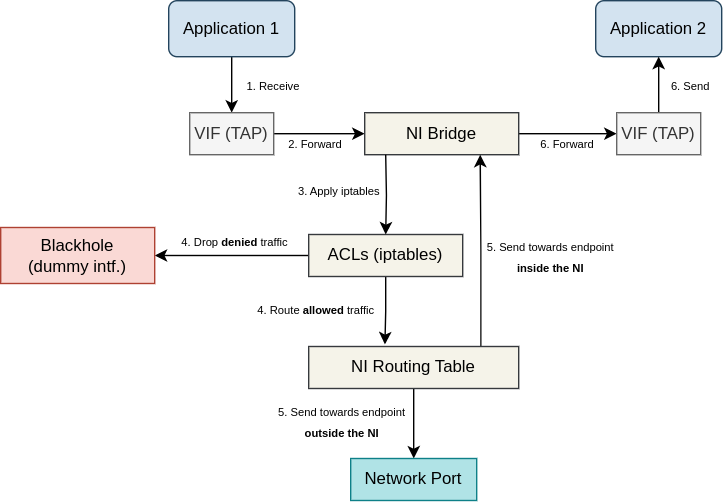
Data-plane of VIFs spans across both guest and host network stacks. Packet sent from an application is routed by the guest OS (Alpine Linux for container apps) and transmitted across a VIF into the host network stack. It arrives via TAP/xen-backend and gets forwarded to the NI bridge. Next, ACLs implemented using iptables are applied and the packet is either allowed to continue or gets dropped. If flow logging is enabled, this is done by marking the packet with "allow" or "drop" mark. Based on the mark and the src/dst addresses, IP rules either send the packet into the dummy blackhole interface (dropped), or route the packet according to the NI routing table. If flow logging is disabled, packet is allowed or dropped immediately using iptables actions. If the packet is allowed and the destination is external, packet will be transmitted out through one of the network ports used by the network instance. Note that if NI is switch (L2 only), packet will be just forwarded through one of the ports, not routed. If the packet is allowed and the destination is another app (inside the same NI), packet's dst MAC address will be set to the dst app MAC, and it will be forwarded again through the same bridge into the corresponding VIF. Finally, the packet is transmitted from the host network stack into the guest network stack of the destination application, where it will be processed for local delivery. The diagram below depicts all these packet-flow stages:
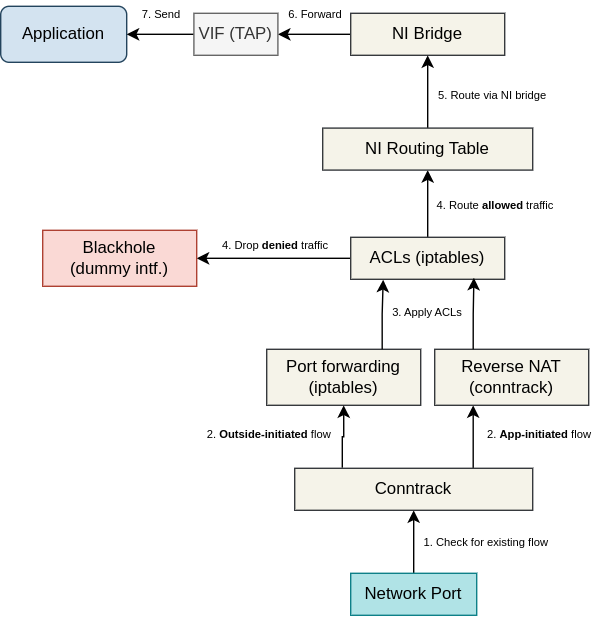
Packet received from outside and destined to an application is received via a network port and matched against active flows tracked by the Linux connection tracking subsystem. In case of an app-initiated flow and a local NI (L3, with NAT), inbound packets will match an existing contract entry and the NATed dst IP address and port number will be reversed back to the application src address. In case of an outside-initiated flow, apps connected over local NIs can only be accessed over port forwarding rules. If a rule is matched, dst IP and port are D-NATed to the application address. Next, ACLs are applied and the packet is either allowed to continue or gets dropped. If flow logging is enabled, this is done by marking the packet with "allow" or "drop" mark. Based on the mark and the dst address, IP rules either send the packet into the dummy blackhole interface (dropped), or route the packet according to the NI routing table. If flow logging is disabled, packet is allowed or dropped immediately using iptables actions. If the packet is allowed, it will match the connected route of the NI bridge and gets forwarded via the bridge and the VIF into the application. Note that in case of a switch NI (L2 only), D-NAT and routing operations are not performed and inbound packets are simply forwarded from the input port, through the bridge and VIF into the application (still the ACLs do apply). The diagram below depicts all these inbound packet-flow stages:
Network instances
Network instance (NI for short) is a virtual switch deployed inside an edge-device, allowing applications (virtual machines or containers) to communicate with one another over a virtual network. Network instance represents a single network segment. Depending on the type and configuration, it is either internal to the edge-node or an extension of an external network segment.
Network instances are a feature of the EVE OS host networking build using various software tools. Applications connect to network instances using virtual network interfaces. Directly assigned physical network ports or SR-IOV VFs bypass the host networking, thus cannot be part of network instances. Apart from VIFs, network instance can be connected to one or more physical or logical (e.g. VLAN) network ports (inside the host) and provide applications external connectivity.
It is possible to deploy any number of network instances onto the same device. Applications connected to the same network instance will be able to talk to each other without having to use any physical network equipment. Reachability between applications in different network instances will be possible only if there is a routed/forwarded path between these network instances across physical ports and their networks. Application is allowed to be connected to multiple network instances and even to have multiple VIFs inside the same NI. In such cases, it is important to have the routing inside the app configured correctly to ensure that a given flow uses the right interface (see Network Instance IP routing).
However, even if the network topology provides a path from one application to another or to an external endpoint, a given flow must still be explicitly allowed by user-configured L3/L4 ACLs. ACLs are configured per application VIF, separately for inbound and outbound directions. By default, application is not allowed to send or receive any traffic with the exception for the DHCP and DNS traffic (i.e. the implicit default rule is to drop everything).
Network instances do not have to be used at all. Applications can simply only use direct assignment of physical NICs or SR-IOV VFs. The downside of direct assignments is less flexibility and less efficient physical resource utilization. Network instances allow to share physical network ports or even to avoid using them when not necessary. The downside of NI is an extra overhead introduced to the data-plane from the virtualization. Performance-sensitive applications should prefer direct assignments and use NIs only for e.g. management traffic.
Presently, EVE provides only 2 simple kinds of network instances: Local and Switch. The idea is that anything more advanced (VPN, network mesh, etc.) should be provided by an application.
Local Network Instance
Local network instance uses a (user-selected) private IP subnet. Traffic flowing between applications and external endpoints is being routed (one hop inside the host) and NATed. This means that packets with IP addressed from the NI private IP subnet never appears outside the edge device. Same is true for application MAC addresses due to the routing hop. For this reason it is more common to let EVE generate MAC address for an application than to configure one statically.
The use of NAT prevent applications from being directly accessible from outside. User must configure port forwarding rules (for TCP or UDP) to allow an external endpoint to initiate communication with an application. These rules are configured as part of network ACLs.
Meanwhile, applications connected to the same Local NI can communicate with each other directly,
they are on the same network segment after all. However, by default EVE grants applications DHCP
leases with /32 IP addresses (even if network prefix of the NI is something else). This is then
accompanied by a link-local route for the whole subnet, with gateway pointing to the IP address
assigned to the NI bridge created inside the host. This seemingly strange configuration makes
traffic going from one app to another routed through the host (even though it could be just forwarded).
We do this because it better enforces the use of ACLs and makes flow logging easier.
The all-ones subnet netmask can be problematic to some applications, however. In such case,
it is possible to disable it (and use proper subnet mask) with debug.disable.dhcp.all-ones.netmask.
For Local network instances, EVE runs basic network services like DHCP or DNS internally. Every application VIF is either automatically allocated IP address or a user-configured IP address is used. In both cases, DHCP server deployed for the NI is configured with a host entry mapping the VIF MAC address (generated or user-defined) to this IP address. EVE will monitor DHCP traffic and detect when the application finally asks for this IP address using its DHCP client. Only then the VIF IP address is published to the controller as part of the Info message.
DHCP server also inform application about the DNS server(s) to use. By default, this will only include the DNS server run be EVE for the NI, listening on the NI bridge IP. In fact, DHCP and DNS servers are deployed by EVE as the same dnsmasq process. User is able to avoid EVE's DNS server from being used and provide its own list of DNS servers for applications.
Additionally, DHCP server can be used to propagate IP routes as well as IP addresses of NTP servers to applications. User is able to configure one NTP server IP per local network instance. This is then merged with NTP server(s) set for NI ports (received from external DHCP servers or configured by the user), and propagated together to the application using the DHCP option 42 (56 in DHCPv6).
DNS server which EVE provides for every Local NI allows resolution of application names to their IP addresses. This is very handy when applications need to talk to each other but cannot predict how EVE will allocate IP addresses between them. Every other name resolution request is just forwarded to DNS servers associated with the NI ports (received from external DHCP servers or configured by the user).
Applications connected to local NI are also provided with access to Metadata HTTP server, running on local-only IP address 169.254.169.254. This can be used by applications to retrieve cloud-init configuration, obtain information from EVE (e.g. device UUID, hostname, external IP address) or to download patch envelopes. More information about metadata server can be found in ECO-METADATA.md.
IPAM
Every Local Network Instance must be configured with an IPv4 network subnet and an IP range within this subnet for automatic IP allocations. Host IP addresses from this subnet that do not fall within the IP range are available for manual assignment.
Whether an IP address is selected manually or dynamically assigned by EVE from the configured IP range, an internal DHCP server is used to distribute these IP addresses to applications. Container applications are deployed inside a "shim VM", which EVE prepares, ensuring that a DHCP client is running for every virtual interface connected to a network instance This guarantees that the IP address is received and applied before the application starts. In contrast, VM applications are responsible for starting their own DHCP client and applying the received IP addresses.
Regardless of the application type, EVE does not automatically assume that the allocated IP address is actually in use. Instead, it monitors the set of IP leases granted by the internal DHCP server and updates the set of application IP addresses in the published info messages accordingly.
Switch Network Instance
Switch Network Instance is a simple L2-only bridge between connected applications and (optionally) one or more network ports. Traffic is only forwarded by the host network stack. This allows applications to directly access external endpoints and vice-versa. Switch network can be configured without port (i.e. as air-gapped), in which case it is merely a bridge between application VIFs.
EVE does not run DHCP server for Switch NI. Instead, external DHCP server from the port's network can be configured by the user to provide IP addresses to applications. In case of air-gap switch NI, one of the applications can run DHCP server for the network.
Application MAC addresses can be either statically user-configured, or generated by EVE. Since multiple edge devices running EVE can connect to the same network segment via switch NIs, the MAC address generator will apply a hash function to the app UUID in an attempt to produce MAC address unique across the entire fleet of devices (and not just within one device).
Despite Switch NI operating only at the L2 layer, the L3/L4 network ACLs are still supported and must be configured to allow anything beyond just DNS and DHCP to pass. Since there is no NAT between applications and external endpoints, properly configured inbound ACL rules are that much more important.
A metadata HTTP server is run for a switch network instance only if it has a port attached that has an IP address.
IP address detection
Unlike a Local Network Instance, a switch network instance is configured without any IP configuration, and EVE does not run an internal DHCP server. Instead, if IP connectivity is required, IP addresses must be assigned statically within the connected applications or provided by an external DHCP server or another application offering DHCP services.
Since EVE is not in control of IP address allocations and leases, it must monitor application traffic to learn which IP addresses are being used and report this information to the controller.
In the case of an external DHCP server (IPv4), EVE captures the DHCPACK packet from the server, which confirms the leased IP address. Because EVE manages MAC address allocations, it knows the MAC address of every application's virtual interface (VIF). It can then map the CHADDR (Client Hardware Address) attribute to the corresponding application VIF and learn the assigned IP address from the YIADDR (your, i.e. client, IP Address) attribute. Additionally, EVE reads the DHCP option 51 (Lease Time), if available, to determine how long the leased IP address is valid. If EVE does not observe an IP renewal within this period, it assumes that the IP address is no longer in use and reports this change to the controller.
For statically assigned IPv4 addresses, EVE captures both ARP reply and request packets to learn
the application VIF IP assignment from either Sender IP + MAC or Target IP + MAC attribute
pairs. Since ARP cache entries have a limited lifetime — typically around 2 minutes — EVE expects
to see at least one ARP packet for every assigned IP within a 10-minute window (this is not
configurable). If no ARP packet is observed within this period for a previously detected IP
assignment, EVE assumes that the IP address has been removed and reports this change to
the controller. EVE also captures ARP packets for IP addresses configured via DHCP, but these
are ignored as the information from the previously captured DHCPACK takes precedence.
Note that ARP-based IP detection is enabled by default but can be disabled by setting
the configuration item network.switch.enable.arpsnoop to false. Change in this config
options will apply to already deployed switch network instances.
For an external DHCPv6 server, EVE captures DHCPv6 REPLY messages. It learns the target MAC address from the DUID option (Client Identifier, option code 1), while the IPv6 address and its valid lifetime are provided by the IA Address (option code 5).
To learn IPv6 addresses assigned using SLAAC (Stateless Address Auto Configuration), EVE captures unicast ICMPv6 Neighbor Solicitation messages. These are sent from the interface with the assigned IPv6 address to check if the address is free or already in use by another host — a process known as Duplicate Address Detection (DAD). The ICMPv6 packet sent to detect IP duplicates for a particular VIF IP will have the VIF MAC address as the source address in the Ethernet header. EVE uses this, along with the "Target Address" field from the ICMPv6 header, to identify the assigned IPv6 address.
EVE is capable of detecting multiple IPs assigned to the same VIF MAC address. This is commonly seen when applications use VLAN sub-interfaces, which share the parent interface's MAC address.
Network Instance Ports
Network instances can be configured with one or more network adapters, which will be used
to provide external connectivity. The network adapter can be a physical network port
(e.g., eth0) or a logical network adapter on top of physical ports (e.g., a VLAN
sub-interface or a LAG). In addition to selecting a specific adapter for NI by referencing
its unique logical label, it is also possible to either use a predefined shared label
or define a custom shared label selecting multiple ports for a network instance.
Predefined shared labels are:
all: assigned to every device network portuplink: assigned to every management portfreeuplink: assigned to every management port with zero cost
Network instance (both Local and Switch) can be configured without any port. In this case, the network is "air-gapped", meaning that it is not reachable from outside and, likewise, it will not provide external connectivity to the applications. Air-gap NIs are used only to connect applications running on the same edge device.
Multi-port Switch Network Instance
A switch network instance with multiple ports enables the following:
- Bridging multiple switches while adding redundant links. STP is used to prevent bridge loops.
- Connecting end-devices (e.g. sensors) to the same Layer 2 segment as applications running on the edge node.
The user can use a shared label to select multiple network ports for a switch network instance. For a port to be eligible for bridging with other ports, it must be configured as app-shared and with DHCP passthrough - meaning it should not have a static IP address or run a DHCP client.
EVE automatically runs the traditional IEEE 802.1D Spanning Tree Protocol (STP) for bridges with multiple ports to prevent bridge loops and the broadcast storms that would result from them. Users can enable BPDU guard on ports intended to connect end-devices, which are not expected to participate in the STP algorithm. Application VIFs always have BPDU guard enabled.
VLAN-aware Switch Network Instance
By default, a Switch Network Instance does not apply any special handling to VLANs. It operates like a traditional Layer 2 switch, forwarding traffic based solely on MAC addresses without considering VLAN tags. This means that the bridge forwards both tagged and untagged frames without altering or interpreting the VLAN tags. As a result, any VLAN-tagged traffic will pass through the bridge unchanged, and no VLAN filtering or segregation will occur unless explicitly configured.
To enable VLAN filtering and make the Switch Network Instance VLAN-aware, the user must designate at least one application VIF or NI port as a VLAN Access Port for a specific VLAN ID. Multiple applications connected to the same Switch Network Instance can either access the same VLAN - allowing direct communication with one another - or be separated into different virtual network segments. In the EVE API, access VLANs are assigned to NI ports within the NetworkInstanceConfig, while VLAN configurations for application interfaces are applied separately via the AppInstanceConfig.
VIFs and NI ports that are not designated as VLAN access ports are configured by EVE as trunk ports, allowing all VLANs with at least one access port.
Local Network Instance IP Routing
Local Network Instance with multiple ports will have link-local and connected routes from all the ports present in its routing table. Additionally, user may configure static IP routes which will be added into the routing table. A static route may reference a particular gateway IP as the next hop, or a logical label of a port to use as the output device, or use a shared label to match a subset of NI ports if there are multiple possible paths to reach the routed destination network.
Multi-Path IP Routing
For every multi-path route with shared port label, EVE will perform periodic probing of all matched network ports to determine the connectivity status and select the best port to use for the route. Note that every multi-path route will have at most one output port selected and configured at any time - load-balancing is currently not supported.
The probing method can be customized by the user as part of the route configuration. If enabled, EVE will check the reachability of the port's next hop (the gateway IP) every 15 seconds using ICMP ping. The upside of using this probe is fairly quick fail-over when the currently used port for a given multi-path route looses connectivity. The downside is that it may generate quite a lot of traffic over time. User may limit the use of this probe to only ports with low cost or disable this probe altogether. Additionally, every 2.5 minutes, EVE will run user-defined probe if configured. This can be either an ICMP ping towards a given IP or hostname, or a TCP handshake against the given IP/hostname and port.
A connectivity probe must consecutively success/fail few times in a row to determine the connectivity as being up/down. EVE will then consider changing the currently used port for a given route. The requirement for multiple consecutive test passes/failures prevents from port flapping, i.e. re-routing too often. This is important, because re-routing may break already established connections between apps and external endpoints. This is due to a change in the IP used for the NAT.
Additionally to connectivity status, there are some other metrics that can affect the port selection decision. For example, user may enable lower-cost-preference for a given multi-path route. In that case, with multiple connected ports, EVE will select the lowest-cost port. Similarly, route that uses multiple wwan ports, can be configured to give preferential selection to cellular modem with better network signal strength.
Network Instance Default IP Route
A typical use case for multi-path routing is the default route. Local NI with multiple ports that have gateway IP defined cannot install default route for each of them into the NI routing table. Load-balancing is not supported and using different metrics (default behaviour in Linux with multiple default routes) would result in only one of these routes being used. It is better to use multi-path routing with the probing and fail-over capability for the default route. For example, user may add default route and use a shared label that matches only those ports that have Internet access. When user-defined default route is not configured but NI has multiple ports assigned, EVE will automatically create multi-path default route with next-hop probing enabled (for ports with zero cost). If the NI uses only uplink ports (i.e. mgmt ports), then additionally to next-hop probing, TCP handshake against the controller URL and the port 443 will be used in the place of the "user-defined probe".
Application IP Routing
Most of the edge deployments will deploy applications that will have connectivity to both WAN (Internet) and LAN (e.g. shop floor, machine floor). There may be a single WAN port and multiple LAN ports. User has the option to either create a single local network instance with all those ports assigned and use the IP routing capabilities of the network instance, or create a separate instance for every port and use DHCP-based propagation of IP routes into applications. The latter option, described below, is more difficult to configure but gives the application full control over IP routing.
EVE uses DHCP (option 121) to propagate:
- connected routes to applications (routes for external networks that NI ports are connected to), and
- user-configured static IP routes to applications
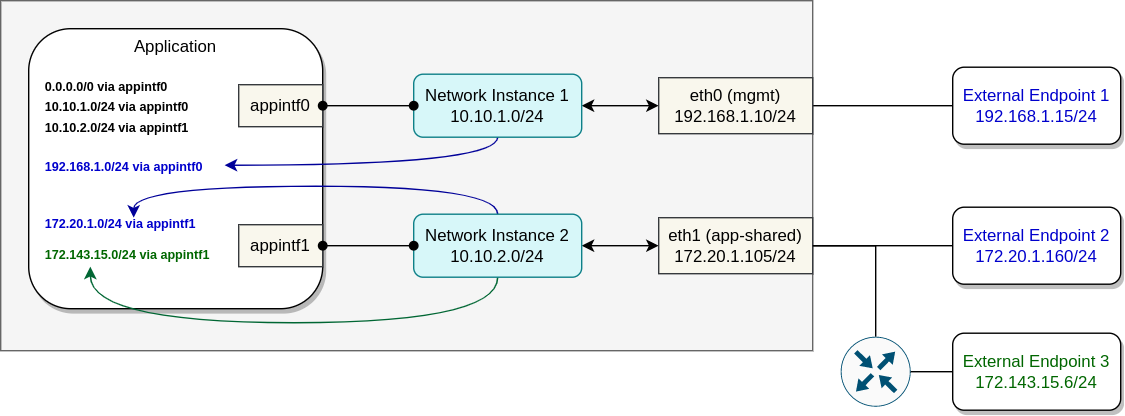
Picture below portrays an example of an application with two interfaces, connected via separate network instances to two different network ports. Blue color is used to highlight the connected routes, which, when enabled, EVE will automatically propagate into the application.
For external networks one or more routing hops away (i.e. not directly connected to the device), user is able to configure static IP routes and let EVE propagate them to the application also using DHCP. Static routes are part of the network instance configuration. User configures destination IP subnets which the network instance will become the gateway for (from the app perspective). In the example below, the propagated static route is highlighted with the green color:
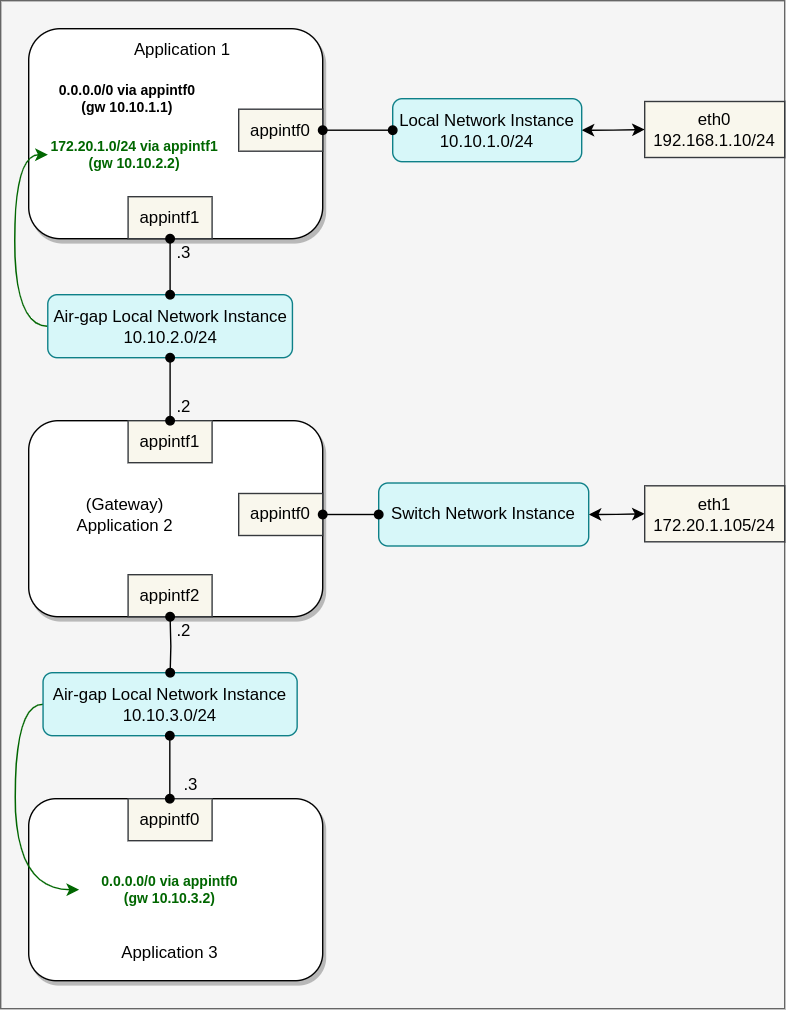
Another common case for route propagation is using one application as a network gateway for other applications running on the same device. The gateway application may provide some network function(s), such as firewall, IDS, network monitoring, etc. Such application will connect on one side with the external network(s) using directly attached network adapter(s) or via switch network instance(s), and the other side will make use of an air-gap local network instance to connect with other applications running on the device. Propagated static IP routes are necessary to make the application traffic flow through the gateway app. In theory, multiple network functions can be chained together in this way using several air-gap network instances with static IP routes.
In the example below, "Application 1" uses "Application 2" as a gateway for only one subnet, while "Application 3" uses the application gateway for all the traffic. Green color highlights static IP routes propagated to applications:
Application Default IP Route
Network instance default route (with the NI bridge IP as the gateway) is automatically propagated by DHCP to connected applications. The exceptions are:
- network instance is air-gapped (without port)
- all ports are app-shared and without default route
In both cases, it is possible to enforce default route propagation by configuring a static default route for the network instance.
Network Instance MTU
The user can adjust the Maximum Transmission Unit (MTU) size of the network instance bridge and all application interfaces connected to it. MTU determines the largest IP packet that the network instance is allowed to carry. A smaller MTU value is often used to avoid packet fragmentation when some form of packet encapsulation is being applied, while a larger MTU reduces the overhead associated with packet headers, improves network efficiency, and increases throughput by allowing more data to be transmitted in each packet (known as a jumbo frame).
EVE uses the L3 MTU, meaning the value does not include the L2 header size (e.g., Ethernet header or VLAN tag size). The value is a 16-bit unsigned integer, representing the MTU size in bytes. The minimum accepted value for the MTU is 1280, which is the minimum link MTU needed to carry an IPv6 packet (see RFC 8200, "IPv6 minimum link MTU"). If the MTU for a network instance is not defined (zero value), EVE will set the default MTU size of 1500 bytes.
On the host side, MTU is set to bridge and app VIFs by EVE. On the guest (application) side, the responsibility to set the MTU lies either with EVE or with the user/app, depending on the network instance type (local or switch), app type (VM or container) and the type of interfaces used (virtio or something else).
Container App VIF MTU
For container applications running inside an EVE-created shim-VM, EVE initializes the MTU of interfaces during the shim-VM boot. MTUs of all interfaces are passed to the VM via kernel boot arguments (/proc/cmdline). The init script parses out these values and applies them to application interfaces (excluding direct assignments).
Furthermore, interfaces connected to local network instances will have their MTUs automatically updated using DHCP if there is a change in the MTU configuration. To update the MTU of interfaces connected to switch network instances, user may run an external DHCP server in the network and publish MTU changes via DHCP option 26 (the DHCP client run by EVE inside shim-VM will pick them up and apply them).
VM App VIF MTU
In the case of VM applications, it is mostly the responsibility of the app/user to set and keep the MTUs up-to-date. When device provides HW-assisted virtualization capabilities, EVE (with kvm or 'k' hypervisor) connects VM with network instances using para-virtualized virtio interfaces, which allow to propagate MTU value from the host to the guest. If the virtio driver used by the app supports the MTU propagation, the initial MTU values will be set using virtio (regardless of the network instance type).
To determine if virtio driver used by an app supports MTU propagation, user must check
if VIRTIO_NET_F_MTU feature flag is reported as 1.
Given that:
#define VIRTIO_NET_F_MTU 3
Check the feature flag with (replace enp1s0 with your interface name):
# the position argument of "cat" starts with 1, hence we have to do +1
cat /sys/class/net/enp1s0/device/features | cut -c 4
1 # if not supported, prints 0 instead
Please note that with the Xen hypervisor, the Xen's VIF driver does not support MTU propagation from host to guest.
To support MTU change in run-time for interfaces connected to local network instances, VM app can run a DHCP client and receive the latest MTU via DHCP option 26. For switch network instances, the user can run his own external DHCP server in the network with the MTU option configured.
With Kubevirt, MTU change after VMI is deployed is not possible. This is because the bridge and the (virtio) TAP created by Kubevirt to connect pod interface (VETH) with the VMI interface are fully managed by Kubevirt, which lacks the ability to detect and apply MTU changes. This means that even if the app updates MTU on its side (using e.g. DHCP), the path MTU may differ because the connection between the VMI and the underlying Pod will continue using the old MTU value.
Network Instance MTU vs. Network Adapter MTU
Application traffic leaving or entering the device via a network adapter associated
with a network instance is also constrained by the MTU of NI ports, as configured
in their NetworkConfig objects (see DEVICE-CONNECTIVITY.md,
section "Network Adapter MTU").
If the user does not configure an MTU (mtu = 0), EVE automatically sets:
- 1500 bytes for air-gapped network instances, and
- The lowest MTU among NI ports for network instances with external connectivity.
If the user configures an MTU, EVE verifies it against the NI port MTUs. If the configured network instance MTU is higher than any NI port MTU, EVE flags the network instance with an error and enforces the lowest MTU among all NI ports. This ensures that applications do not send packets larger than what the physical or virtual interfaces can handle.
Packets larger than the effective MTU will either be fragmented, which can reduce performance, or, if the Don’t Fragment (DF) flag is set, dropped by routers along the path.
To further reduce fragmentation and improve reliability, EVE can automatically clamp the TCP Maximum Segment Size (MSS) for forwarded traffic, ensuring TCP segments fit within the path MTU. This is described in the following section.
TCP MSS Clamping
EVE automatically applies TCP Maximum Segment Size (MSS) clamping to forwarded application TCP traffic to prevent IP fragmentation when the path MTU cannot be reliably propagated to the application.
Why it is needed
Applications running in VMs or containers often cannot receive the actual MTU of the egress network interface:
- MTU propagation requires a DHCP client inside the app that is configured to request the MTU option, or a recent virtio driver that supports MTU propagation.
- When the network instance is rerouted to a different uplink, the new MTU is applied only after the app’s DHCP lease expires.
- Containers inside VMs may ignore propagated MTU values altogether.
Without MSS clamping, applications might continue sending packets larger than the real path MTU, causing fragmentation or even dropped packets if Don’t Fragment (DF) flag is set. If ICMP Fragmentation Needed messages are filtered, the sender cannot detect the issue, leading to retransmissions and connection stalls.
How it works
The kernel’s Netfilter subsystem automatically adjusts (clamps) the TCP MSS in SYN and SYN-ACK packets to fit the path MTU.
The path MTU is determined from the output interface MTU and cached ICMP feedback (if available). Even if ICMPs are blocked, the interface MTU still provides a safe upper bound (especially when device is running at the network edge).
The MSS is determined by taking the minimum of the path MTUs in both directions of the flow, ensuring packets in either direction fit the path. The MSS in the packet is only ever reduced, never increased.
The calculated MSS is written into the TCP options of the packet, and the TCP checksum is automatically recalculated to reflect the change.
The rule is implemented in the mangle table (FORWARD chain) using iptables:
- One rule for IPv4 (iptables)
- One rule for IPv6 (ip6tables)
Configuration
By default, MSS clamping is enabled for all forwarded application traffic.
It can be disabled using the global configuration property: app.enable.tcp.mss.clamping
This allows to disable clamping in case it causes some undesired behaviour.
Flow Logging
If enabled for a given NI, EVE uses Linux connection tracking to periodically (every 2 minutes) record all application TCP and UDP flows. A flow record encapsulates application UUID, VIF name, open/close timestamps, src/dst IP/port/proto 5-tuple, packet and byte counters.
Additionally, EVE captures DNS packets to make a recording of every DNS request from application. This includes the request time, hostname that was being resolved and the returned IP address(es).
A batch of new flow records is published to the controller (POST /api/v1/edgeDevice/flowlog)
inside FlowMessage.
If flow logging is not needed, it is recommended to disable this feature as it can potentially generate a large amount of data, which is then uploaded to the controller. Depending on the implementation, it may also introduce additional packet processing overhead.
Network Performance Considerations
Deploying applications as virtual machines on EVE-OS offers flexibility and isolation. However, optimizing network performance requires careful attention to EVE-OS networking mechanisms and available optimizations. This article examines network performance considerations to maximize efficiency, minimize overhead, and leverage recent advancements in EVE-OS.
Direct NIC Assignment For Optimal Performance
For the best possible network performance, direct assignment of NICs to VMs through PCI passthrough is recommended. This approach provides the least overhead by allowing the VM to control the network interface card (NIC) directly, bypassing hypervisor-layer processing. PCI passthrough achieves near-native performance levels, which is particularly beneficial in network-intensive applications like NFV (Network Function Virtualization).
SR-IOV For Improved Hardware Utilization
For deployments where hardware resources are limited and sharing is essential, Single Root I/O Virtualization (SR-IOV) offers a compromise between performance and scalability. SR-IOV allows multiple VMs to share a single physical NIC by creating virtual functions (VFs) that are assigned directly to VMs. While SR-IOV introduces slightly more overhead than PCI passthrough, it still provides high throughput and low latency compared to fully virtualized solutions.
However, it is important to point out that SR-IOV is not supported by all NICs. Typically, higher-end NIC models (often found in enterprise-grade or data center hardware) support SR-IOV, while consumer-grade NICs may lack this feature. Before considering SR-IOV, ensure that the network interface card in use supports it. Additionally, ensure that the Physical Function (PF) driver required for the target NIC is included in EVE-OS, and that the Virtual Function (VF) driver is properly installed within the application.
Overhead of Virtual Interfaces
Network instances in EVE-OS are implemented using a Linux bridge connecting VMs through virtual interfaces. For optimal performance, hardware-assisted virtualization should be enabled, allowing the use of para-virtualized VirtIO drivers rather than the older emulated e1000 drivers.
Using virtIO network interfaces is preferred over emulated e1000 interfaces because virtIO offers significantly better performance by providing a more efficient, para-virtualized interface designed specifically for virtual environments. Unlike the emulated e1000, which mimics physical hardware and incurs higher CPU overhead due to the need for software emulation, virtIO operates with lower latency and reduced CPU usage by allowing the guest VM to directly communicate with the hypervisor.
Understanding Linux Network Stack Limitations
When utilizing network instances in EVE-OS, understanding the Linux network stack limitations is important, especially in environments with high network traffic. While Linux provides a versatile and robust network stack, there are several performance-related concerns when the stack is under heavy load:
-
Context Switching Between Userspace and Kernel Space: In typical Linux networking, packets are processed through both kernel and userspace. When a packet is received, the kernel processes it in kernel space, and if further user-level handling is required (e.g., for application processing), the packet data is copied to userspace. This frequent switching between userspace and kernel space can create significant overhead, particularly when dealing with high number of packets per second (PPS). This can be mitigated by using a higher MTU (also known as jumbo frames) or leveraging segmentation offloading - if supported by the hardware.
-
Memory Copy Between Kernel Space and Userspace: In addition to context switching, transferring packet data between kernel and userspace incurs memory copy overhead. When a packet is handled by the kernel, the data often needs to be copied into a userspace buffer for application-level processing. These memory copies not only add CPU load but also increase the latency of packet delivery.
-
Interrupt Handling Under Heavy Load: As traffic increases, the system must process a growing number of interrupts from network interfaces. Each interrupt triggers the kernel to process packets, but under high network load, this can lead to a situation known as interrupt storming, where the CPU spends most of its time handling interrupts rather than processing application logic. This issue is mitigated by NAPI, a component of the Linux kernel utilizing batch processing and polling to reduce the frequency of interrupts.
Overhead of Local vs. Switch NI
EVE-OS supports two primary network instance types:
- Local Network Instance: This instance type uses a private IP subnet that isolates VMs from external networks via NAT. Local instances are useful for secure, isolated environments but introduce routing and NAT-related overhead (routing table lookup, connection tracking/lookup, MAC/IP/L4-port rewrite, etc.), impacting network throughput.
- Switch Network Instance: A simple bridge that links VMs to external networks without NAT, making it more suitable for performance-sensitive north-south traffic (traffic between the host and external networks). The absence of NAT in Switch instances results in reduced overhead, translating to higher performance for network applications that require direct access to external resources.
Impact of iptables for ACLs in Network Instances
EVE-OS uses iptables to implement Access Control Lists (ACLs) within network instances. While iptables offer flexibility and are widely adopted, they introduce significant overhead due to the linear processing of chains and rules for each packet. Connection tracking provided by Netfilter (conntrack) is also used for flow logging purposes.
In version 13.7.0, EVE-OS introduced an optimization to completely bypass iptables for east-west
traffic (between VMs on the same host) and for switched north-south application traffic when
flow-logging is disabled and ACLs are configured by user to allow unrestricted access (using allow
rules for 0.0.0.0/0 and ::/0). For NFV use-cases, where packet filtering is typically handled
by a dedicated firewall VNF, bypassing iptables helps to avoid unnecessary processing and improves
performance.
To check if iptables are bypassed for L2-forwarded application traffic, run these commands inside EVE:
# Returns 0 if iptables are not used for forwarded IPv4 traffic.
sysctl net.bridge.bridge-nf-call-iptables

# Returns 0 if iptables are not used for forwarded IPv6 traffic.
sysctl net.bridge.bridge-nf-call-ip6tables
Please note that iptables (and conntrack) are always enabled for routed traffic as well as for EVE management traffic.
Packet Capture Optimizations for Learning App IP Addresses
EVE-OS relies on packet capture to identify IP addresses assigned to applications inside
switch network instances (DHCP server is running outside of EVE in this case).
While this mechanism cannot be disabled, EVE version 13.7.0 includes optimizations to significantly
reduce the performance impact of packet inspection. These improvements help maintain efficient
packet flow without compromising the EVE-OS ability to monitor application IP usage.
Details on the optimized packet sniffing can be found in zedrouter.md,
section NI State Collector.
Enforced Routing
In earlier versions of EVE-OS, a /32 all-ones netmask was applied to VM IP addresses within
Local network instances to enforce routing, even when traffic could have been directly forwarded.
This approach was used to support ACL implementation but introduced additional routing overhead
for east-west traffic processing. However, since the /32 netmask and the associated routes
would confuse some applications, it was possible to disable all-ones netmask using the configuration
property debug.disable.dhcp.all-ones.netmask. Starting with the EVE version 13.7.0, the use of
/32 netmask has been completely removed (and the config property is NOOP), as ACLs no longer
rely on the enforced routing.
VHost Backend for VirtIO Interfaces
Since version 13.7.0, EVE-OS has enabled the vhost backend for virtio-net interfaces, significantly enhancing performance by avoiding QEMU involvement in packet processing. Prior to this change, QEMU would process network I/O in user space, which incurs significant CPU overhead and latency due to frequent context switching between user space (QEMU) and kernel space. With vhost, packet processing is handled by a dedicated kernel thread, avoiding QEMU for most networking tasks. This direct kernel handling minimizes the need for QEMU’s intervention, resulting in lower latency, higher throughput, and better CPU efficiency for network-intensive applications running on virtual machines.
Reducing QEMU overhead is especially important for EVE, where we enforce cgroup CPU quotas to limit
application to using no more than N CPUs at a time, with N being the number of vCPUs assigned
to the app in its configuration (see pkg/pillar/containerd/oci.go, method UpdateFromDomain()).
These CPU quotas apply to both the application and QEMU itself, so removing QEMU from packet
processing is essential to prevent it from consuming CPU cycles needed by the application.
Please note that the vhost backend is used exclusively with virtio-net interfaces. Applications deployed in LEGACY virtualization mode with emulated e1000 network interfaces continue to rely on QEMU for packet processing, resulting in suboptimal network performance and CPU utilization.
Segmentation and Receive Offloading
Enabling TSO/GSO/GRO provides significant performance benefits for both east-west and north-south traffic in EVE-OS. For east-west traffic, it allows data to be transferred in larger 64KB packets, avoiding the need to split them into smaller MTU-sized packets, which is unnecessary on purely virtual paths. This enables more data to be transferred with fewer packets, reducing packet processing overhead. For north-south traffic, TSO/GSO/GRO offloads packet segmentation and reassembly tasks to the physical NIC, which further reduces CPU load and enhances network efficiency.
In container applications, which are deployed on EVE inside a shim-VM for isolation purposes,
offloading is enabled for VirtIO interfaces by default. In VM applications, this is outside
the EVE OS control. For Linux-based virtualized applications, use ethtool -k <interface>
to check if offloading is enabled and ethtool -K <interface> <tso/gso/gro> <on/off>
to enable/disable it.
Performance Considerations Recap
Achieving optimal network performance on EVE-OS requires careful consideration of hardware compatibility, network instance configurations, and specific feature usage to minimize overhead and maximize throughput. Here is a summary of the best practices and recommendations to enhance network performance for virtualized applications deployed on EVE-OS:
- For applications demanding the highest network performance, directly assigning a NIC to a VM through PCI passthrough is recommended. This approach minimizes overhead by allowing direct hardware access, resulting in near-native performance.
- When hardware resource sharing is necessary, use SR-IOV (where supported by the NIC) to achieve a balance between performance and scalability.
- For virtual interfaces connected to network instances, enable hardware-assisted virtualization to use virtIO drivers over emulated e1000 to reduce the CPU overhead and the latency.
- Be aware of the Linux network stack's limitations, including context-switching, memory copy between kernel and userspace, and interrupt handling under heavy load. Whenever possible, leverage PCI passthrough, SR-IOV, or virtIO with the vhost backend to reduce processing bottlenecks.
- Select the appropriate Network Instance type. For north-south traffic (traffic to and from
external networks), prefer Switch network instance over Local NI to avoid routing and NAT overhead.
In terms of VM-to-VM connectivity, both types of network instances offer comparable performance
when the all-ones (
/32) netmask is disabled. - Allow everything in the ACL config for EVE OS and disable flow logging if the access-control and flow monitoring functions are being handled by application(s) instead. Starting from EVE 13.7.0, this will result in iptables being bypassed and the iptables overhead completely avoided for east-west traffic in every NI as well as for north-south traffic inside Switch NIs.
- Enable TSO/GSO/GRO to reduce CPU overhead caused by excessive packet segmentation and reassembly handled in software.
- Use EVE version 13.7 or later to take advantages of all the performance optimizations described above.
Link-Local Protocol Forwarding
Network Instances in EVE are implemented using Linux bridges, which by default conform to
the IEEE 802.1D standard. This standard mandates strict filtering of Ethernet frames sent
to reserved multicast destination MAC addresses in the range 01:80:C2:00:00:00 to
01:80:C2:00:00:0F. These addresses are typically used by link-local control protocols
that are not meant to be forwarded by switches or bridges.
One such protocol is LLDP (Link Layer Discovery Protocol), which uses EtherType 0x88cc
and destination MAC 01:80:C2:00:00:0E. In standard Linux bridge configurations,
LLDP frames are silently dropped and not forwarded across ports in the bridge.
While this behavior is appropriate for physical switching hardware, it can cause
problems in virtualized or containerized environments, where forwarding LLDP frames
may be necessary to support topology discovery or integration with virtual network
infrastructure.
To address this, EVE provides the forward_lldp option in the Network Instance
configuration. When this option is enabled, the bridge is configured to forward
LLDP frames between connected interfaces.
By default, forward_lldp is unset (false), meaning LLDP forwarding is disabled
to maintain backward compatibility with older EVE versions that do not yet support
this option.
Only protocols permitted by the Linux kernel can be selectively forwarded. Some protocols (e.g., STP, pause frames, LACP) use reserved addresses that are hardcoded in the kernel to be non-forwardable and cannot be enabled via configuration.
While only LLDP forwarding is currently configurable via the API, support for additional link-local protocols such as EAPOL (802.1X authentication) and MVRP (Multiple VLAN Registration Protocol, 802.1AK) may be added in the future, subject to kernel limitations and user demand.
Forwarding Between Physical Ports
When LLDP forwarding is enabled and a switch network instance is configured with multiple physical interfaces, LLDP frames will be forwarded between all ports, including between physical ports. This means that LLDP advertisements received from one external device may be forwarded to another external device connected to the same switch network instance.
While this behavior supports full visibility of LLDP traffic in virtualized and mixed environments (e.g., between VMs and physical devices), it may not always be desirable to forward LLDP frames between physical devices. For example, LLDP forwarding from a physical port to another might violate network isolation or lead to unintended topology propagation.
Although the current implementation takes a simplified approach — either fully enabling
or fully disabling LLDP forwarding — a more granular forwarding model (e.g.,
disabling forwarding between physical ports) may be introduced in the future
if a clear use-case arises. For now, enabling forward_lldp allows LLDP frames
to be forwarded between:
- app instance to app instance
- app instance to external device
- external device to app instance
- and external device to external device
Administrators should be aware of this behavior when enabling LLDP forwarding in scenarios involving multiple physical interfaces connected to the same switch NI.